Hand-Drawn Clipping Path Service
100% manual Photoshop Pen Tool vector paths for razor-sharp e-commerce cutouts, multi-path selections, and marketplace compliance.
Drag the slider or use arrow keys to inspect raw vs. finished studio QA.
Technical Specifications & Craft
Built For Shopify, Amazon, WooCommerce & Global Catalogs
Welcome to our professional clipping path service! We specialize in providing high-quality and accurate clipping path services to businesses and individuals worldwide. Our team of experienced and skilled designers uses the latest tools and techniques to deliver outstanding results that meet our clients' needs and exceed their expectations.
A clipping path is a technique used to remove the background of an image or isolate a specific object from its background. It is a crucial aspect of image editing and is widely used in e-commerce, advertising, and other industries. Our clipping path service is perfect for anyone who wants to improve the quality of their images, whether for personal or professional use.
We offer a wide range of clipping path services, including simple, compound, and complex clipping paths, as well as multi-clipping paths, which allow us to separate individual elements of an image. Our team can handle any type of image, from basic shapes to intricate designs, and we ensure that the final result is accurate, clean, and of the highest quality.
At our clipping path service, we understand that every client has unique needs and preferences, and we work closely with you to ensure that we deliver exactly what you're looking for. Our prices are competitive, and we offer quick turnaround times without compromising on quality. We also offer bulk order discounts and custom packages tailored to your specific requirements.
If you're looking for a reliable and professional clipping path service, look no further than us. Contact us today to learn more about our services and how we can help you achieve your goals. With our expertise and dedication to quality, you can trust us to deliver outstanding results every time.
Studio Job Specification & Proof
What to Upload & What We Deliver

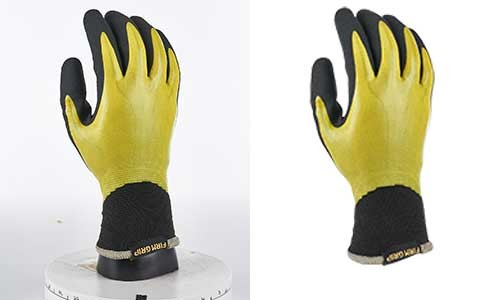
Studio portfolio comparison: Clipping Path — drag the slider to inspect raw capture vs. finished retouch.
- Source Files to Upload
- RAW, TIFF, PSD, or high-res JPEG packshots (single or multi-component SKUs)
- Typical Raw-Shot Issue
- Cluttered studio backdrop, uneven lighting spill & soft edge halos from automated tools
- Manual Studio Edit Applied
- 100% manual Photoshop Pen Tool closed vector path (0.5px inset) + tri-background Black/Gray/White QA
- Final Deliverable
- Embedded vector paths in PSD/TIFF/JPEG plus pure white or transparent PNG cutouts in 12–24h
Studio Workflow
How Clipping Path Works
Upload Or Sync SKUs
Drop RAW, PSD, TIFF, PNG, or JPEG batches up to 2 GB via 256-bit encrypted cloud transfer—or sync products directly from Shopify and our REST API v1.
Lock Your Brand Preset
Specify margin ratios, pure white RGB (255,255,255) or Warm Ivory backgrounds, contact shadow softness, 3D neck-joint depth, or AI studio model cast.
AI Speed Or Photoshop Pod
Run instant self-serve AI cutouts, 3D ghost mannequin, flat-lays, and virtual try-on—or assign intricate hero SKUs to 24/7 senior Photoshop specialists.
3-Point QA & Channel Export
Every manual asset passes Black/Gray/White edge QA and ships sized for Shopify, Amazon, WooCommerce, Etsy, BigCommerce, Magento & eBay.
Common Questions
Clipping Path FAQs
Why choose hand-drawn clipping paths over AI background removers?
Hand-drawn Photoshop Pen Tool paths eliminate milky halos, jagged stair-stepping, and soft edge bleeds that automated AI tools leave behind—especially on glossy, white-on-white, or complex geometric products.
Do you offer multi-clipping paths for color correction?
Yes. We create separate, clearly named vector paths for individual product components (such as soles, laces, collars, or gemstones) so your team can recolor or adjust parts independently.
What is the turnaround time for bulk clipping path orders?
We process up to 2,000+ hand-drawn clipping path images per day with standard 12–24 hour delivery and 4–6 hour rush options for urgent catalog deadlines.
Can you deliver layered PSD or TIFF files with embedded paths?
Yes. We deliver saved vector clipping paths inside PSD, TIFF, EPS, or JPEG files, alongside transparent PNG or pure white (RGB 255,255,255) marketplace-ready exports.
Complementary Services
Pair With Other Studio Desks
2026 Technical Manuals
Deep-Dive Studio Guides
Two Ways To Start · Zero Risk
Ready To Scale Your Product Visuals?
Upload 2–3 raw packshots (RAW, PSD, TIFF, JPEG up to 2 GB) for a free human calibration test in 12–24 hours—or launch Dinamico AI Studio right now with 20 free HD cutout credits.